
I can't find the Instructions

Can’t Find Your Instructions? Here’s How to Fix It
Nearly all Kreative Kiwi design sets include a PDF Instruction File
(only very simple one–colour Redwork designs don’t).
If you can’t find your instructions, they’re almost always right there — just hidden!
Here’s how to locate them:
Unzip Your Downloaded File
Your design set arrives as a ZIP file.
After you extract/unzip it, you’ll see a folder containing:
-
All embroidery formats
-
Photo of designs
-
PDF instructions
Look for the PDF inside the unzipped folder - it will generally start KK-Instructions
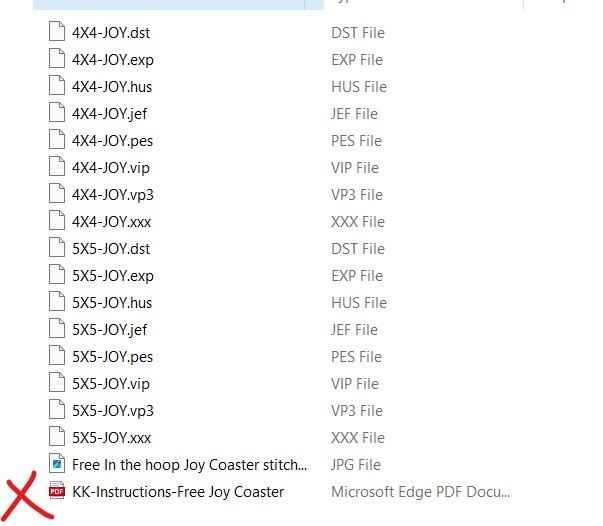
Make Sure You Can See ALL Files
If you still don’t see the PDF:
✔ Sort files by Type
✔ Search for .pdf
✔ Check that your computer is showing ALL file types/filters
Sometimes PDF files are hidden if filters or view settings are turned on.
Using a Phone or Tablet?
Some devices don’t show PDFs without a viewer app.
If in doubt, check again on a laptop/desktop.
Still Stuck?
I’m always happy to help! - email heather@kreativekiwiembroidery.co.nz